
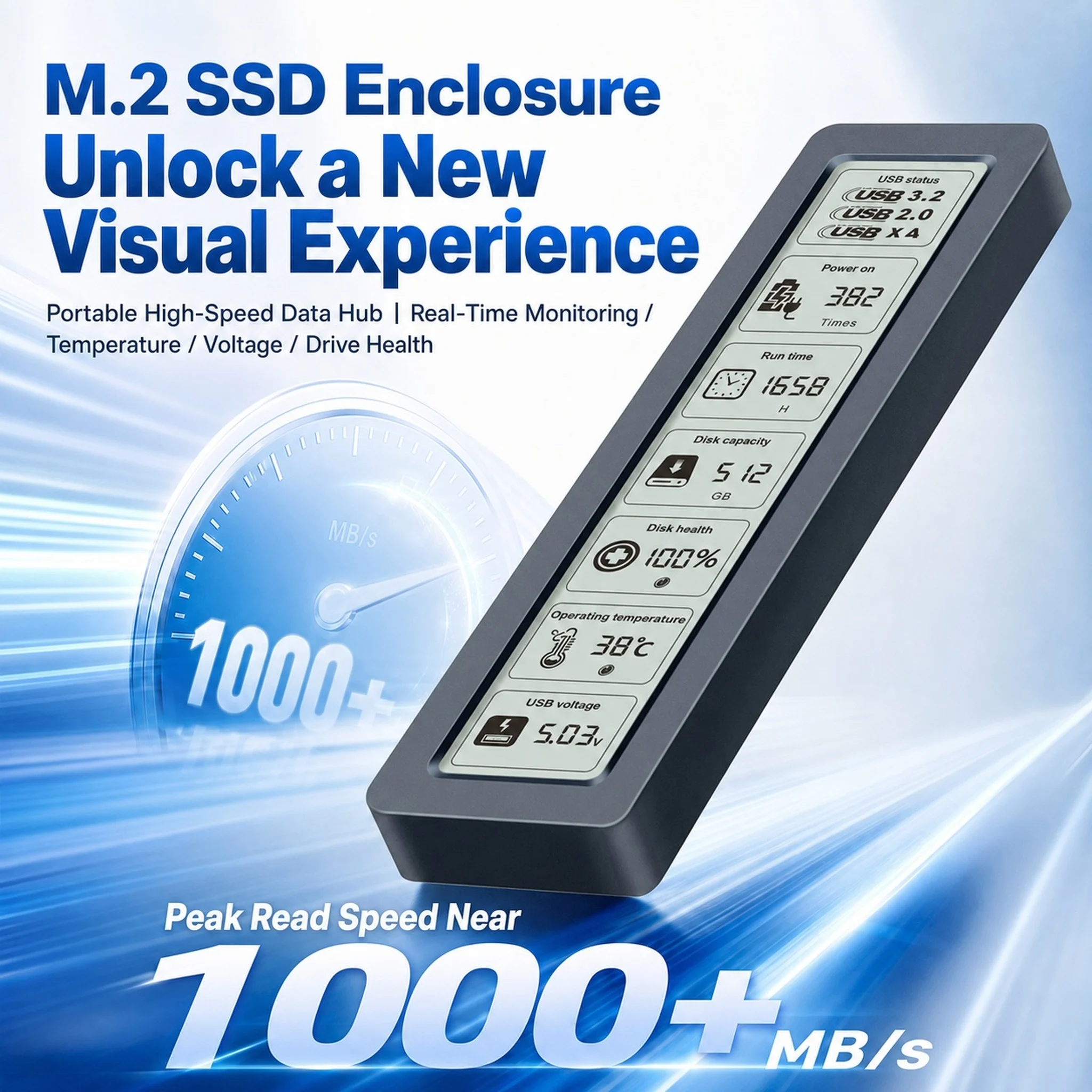
M.2 NVMe SATA SSD Enclosure Visual Smart SSD Case USB 3.2 Gen 2 10Gbps NVMe PCI-E 20Gpbs
Return&refund policy
Eligible items are covered by return and refund support. If the item does not arrive or is not as described, the buyer can request help.
Security & Privacy
Safe payments: We do not share your personal details with any third parties without your consent.
Secure personal details: We protect your privacy and keep your personal details safe and secure.
AI offer for your market
A curated pick based on category, shipping route, delivery speed and popularity in your selected market.
Why this product fits your market
- • Estimated delivery: 7.
- • Strong customer signal: 4.7★ from 576 reviews.
- • Recommendations focus on this product category and your market availability.



Product specifications
Detailed product description
This product is shown with available options, market-specific pricing and verified specifications.
- Brand: NoEnName_Null
- Sales: 1000+
- Package size: 17 × 11 × 4 cm
- Package weight: 0.171 kg
- Rating: 4.7 / 5
Before adding to cart, choose an available option and check the quantity.
20Gbps NVMe & SATA Dual Protocol
Adopting the latest USB 3.2 Gen 2x2 interface and equipped with a 3.8-inch display screen, this enclosure can real-time display the drive's SMART health information.
This M.2 enclosure delivers a 20Gbps data transfer speed for NVMe solid-state drives, while supporting SATA protocol with up to 6Gbps bandwidth. It supports hard drives with a maximum capacity of 8TB.
3.8'' HD Screen | 170° Anti-Glare Wide View
Real-time drive status monitoring, no software required, low power & long lifespan
10Gbps High-Speed Transfer
UASP+TRIM Accelerated, 1GB File in 1 Second
Dual-Chip Coordination
Optimized Speed & All-Round Circuit Protection
Ice-Scale Alloy Cooling
Sustained Full Speed, No Thermal Throttling
Up to 8TB Mass Storage
Store All Your Media & Project Files Freely
Multi-Layer Metal Shielding
Dual EMI & Corrosion Resistance Tested
Multi-Device Compatible
Wide cross-device compatibility for higher efficiency
Full-Size SSD Support
Fully compatible with 2230/2242/2260/2280 NVMe & SATA M.2 SSDs. Driver-free plug-and-play on computers, tablets and phones
Hard disk health monitoring
Come with HD display to monitor your hard drive usage in real time
Display content includes
Disk health/Run time/Operating temperature/Total data writes/Power on/USB voltage.
The datas on the display allow you to monitor the usage of the hard disk more directly
When your hard drive health is below 100%, you need to pay attention to backup data in time.
Note: To perfectly reflect product performance (up to 10Gbps)for NVMe PCI-e
Please connect this M.2 SSD enclosure to a device with a USB 3.2 gen 2 standard interface.
The solution to the problem that the device cannot recognize the SSD through this M.2 enclosure USB C.
For a new SSD
You should format it into Exfat or NTFS format before use, then it could be detected and used normally.
Please finish disk initialization according to the following steps.
How to start disk management?
Right-click "Computer' "Manage' "Disk Management", Find your unallocated disk, right-click "Unallocated", andchoose"New Simple Volume Wizard".
How to start disk management (in windows 10)?
Click Start -> Run -> type compmgmt.msc -> click OK. Alternatively, right-click on the My Computer icon and select'Manage'. In the console tree, click Disk Management.