
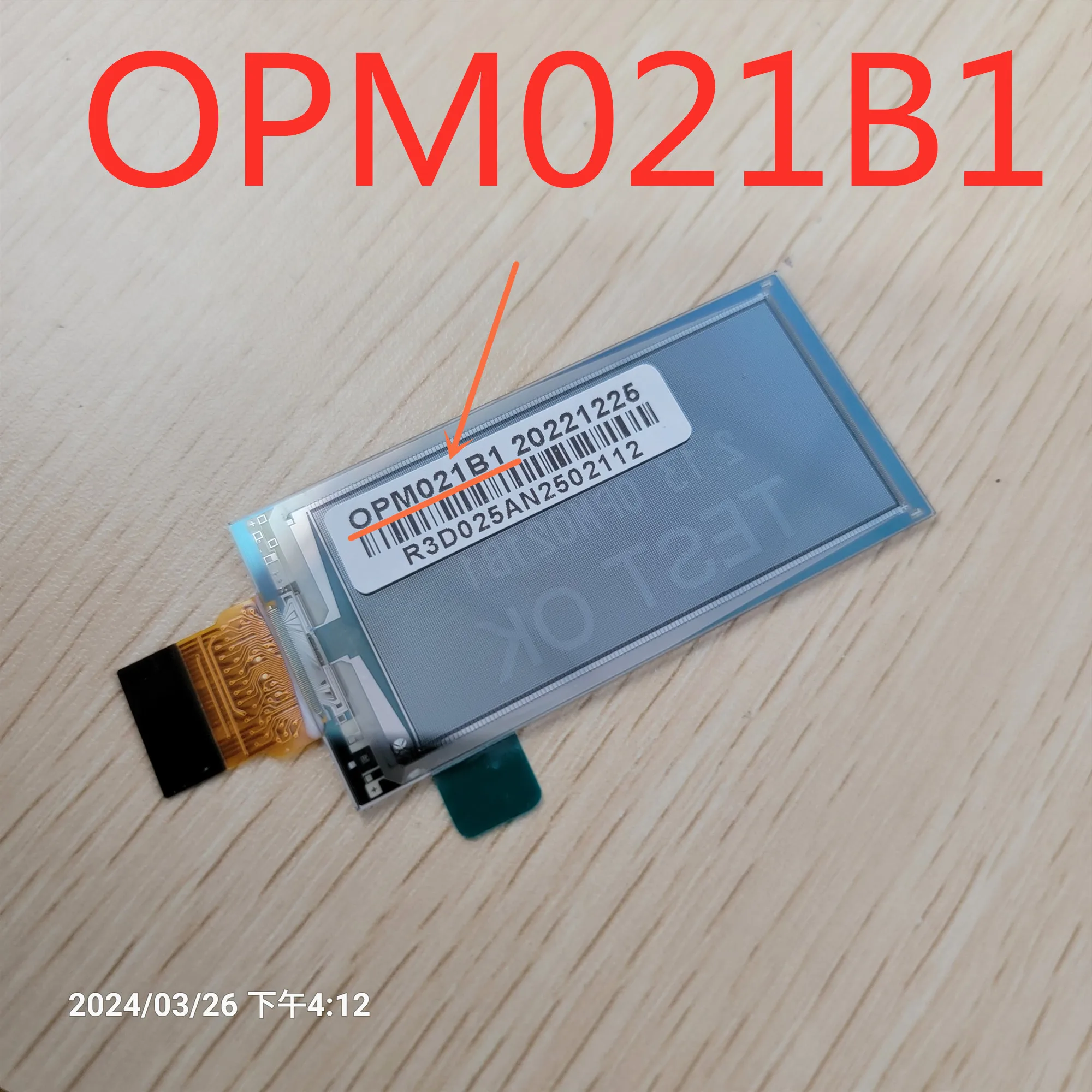
OPM021B1 OPMO21B1 2.13 Inch For Netatmo Pro Smart Thermostat NTH-PRO LCD Display screen
Return&refund policy
Eligible items are covered by return and refund support. If the item does not arrive or is not as described, the buyer can request help.
Security & Privacy
Safe payments: We do not share your personal details with any third parties without your consent.
Secure personal details: We protect your privacy and keep your personal details safe and secure.
AI offer for your market
A curated pick based on category, shipping route, delivery speed and popularity in your selected market.
Why this product fits your market
- • Estimated delivery: 7.
- • Strong customer signal: 4.9★ from 55 reviews.
- • Recommendations focus on this product category and your market availability.



Product specifications
Detailed product description
This product is shown with available options, market-specific pricing and verified specifications.
- Brand: QVK
- Sales: 123
- Package size: 15 × 10 × 3 cm
- Package weight: 0.2 kg
- Rating: 4.9 / 5
Before adding to cart, choose an available option and check the quantity.
QVK touch offcial flagship store
(Order Instructions)
1. Each screen is tested before shipping,makeing sure 100% working
2. If you search it by model number of tablet,it better to check the
cable code of touch screen and lcd scren,Because some tablets are using
different cable code for same tablet.
just can guarantee the one that you received that will be compatible
with your tablet, if yours is not as same cable code as the pictures on
web! thanks
4.Please kindly leave us your exact full name (especially buyer from RU )
and Telephone No., in your order as buyer, so that the courier can
delivery the your items timely and easily.
Above
& following provisions take effect once upon you place an
order!
(Very important for you,Please read it before bidding.)
Product Photos
save your money and your time,it is better for you to order 2pcs,since it is fragile item!
How to distinguish the accessories that you need to replace?
1.Touch
Panel Digitizer: If the touch panel /Touch glass is cracked or broken
but the image under it is fine(you can watch full image), then you only
need to buy Touch Screen
2.LCD
Display: If the image under the touch screen is broken(you can not
watch full images),but touch screen is working then you only need LCD
display
3.Full
Parts(lcd display with touch screen): If the touch panel is broken and
the lcd image is either black liquid or cracked you need a complete
screen!
Tips
Unlike
the Car GPS, some of which are not universal, so it is better for you to
ask a maintenance master to refresh the program. There are also
different signs of button, which aslo can be adjusted in the settings
You can download a Master Lu, then adjust in the screen detection or the
driver setting;Also you can rectify it in the setting mode, there are
many modes! If touching is just opposite up and down or left and right
not the touch screen is broken, it is the problems of the vehicle Module
setup!
Press and hold the screen
display area with five or three fingers at the same time (long press for
about 11 seconds) until you exit the screen calibration page, and then
follow the prompts! If you cannot click it by button, you try to click
with mouse after connectting an external USB mouse!
the password [different models and motherboards have different
behind the machine] or expand the settings touch screen settings button
learning panel buttons, touch area buttons (The area of touch button
you can first press the touch power button on the glass, then press the
power button on the machine!)
Repair steps (only for reference)
1.You can repair it by yourself,but it is better for you to find a professional man to help you.
2.During
testing it,if it cannot working,dont forget to reset it or update the
software,if it still cannot work after restart (turn it off/on by button
get your leaving message,thanks (After testing it and working,then you
can remove the glue and install it,The last step "dont forget to leave
Packing
1.Please take a video during open the package. (If there is any damage in transit, you can send this video as evidence )
2.We
are really appreciate it if you would like to let us know the your
brand name and detail model number of your tablet,when you search it
only through code number during the order.:)
Our working hours are(Monday - Friday)
CN: 8 AM - 6 PM RU: 3 AM - 1 PM
AU: 10 AM - 8 PM UK: 1AM - 10 AM