
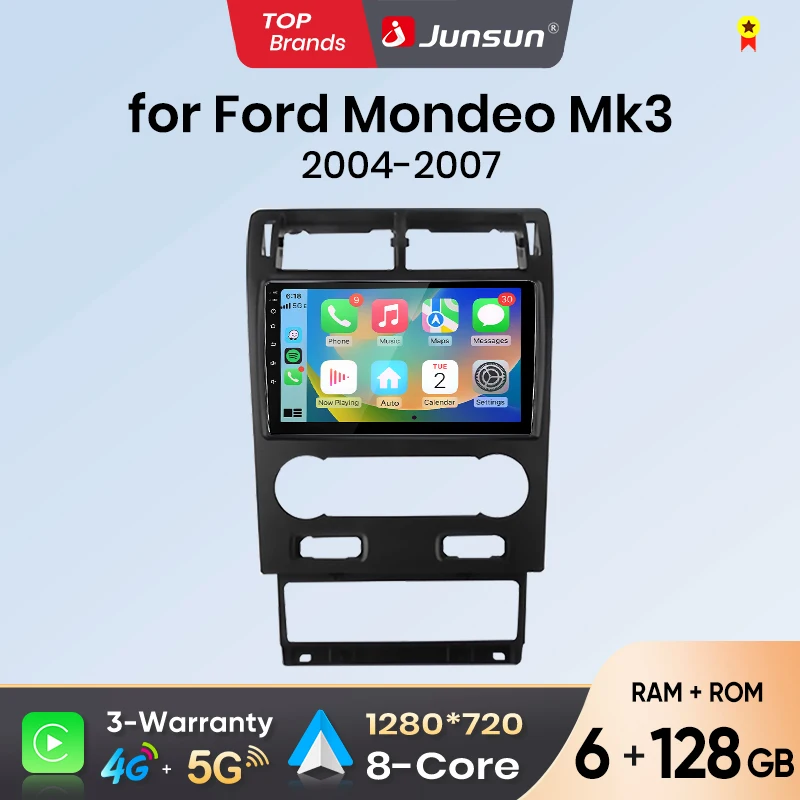
Junsun Android Auto Car Radio For Ford Mondeo Multimedia Wireless CarPlay SWC GPS Navi RDS DSP FM
Return&refund policy
Eligible items are covered by return and refund support. If the item does not arrive or is not as described, the buyer can request help.
Security & Privacy
Safe payments: We do not share your personal details with any third parties without your consent.
Secure personal details: We protect your privacy and keep your personal details safe and secure.
AI offer for your market
A curated pick based on category, shipping route, delivery speed and popularity in your selected market.
Why this product fits your market
- • Estimated delivery: 7.
- • Recommendations focus on this product category and your market availability.
Product specifications
Detailed product description
This product is shown with available options, market-specific pricing and verified specifications.
- Brand: Junsun
- Sales: 7
- Package size: 30 × 20 × 20 cm
- Package weight: 3 kg
- Rating: 0.0 / 5
Before adding to cart, choose an available option and check the quantity.
>> Why choose Junsun?
>>Product Description & Version Guide
Our car radio integrates cutting-edge features to elevate your in-vehicle experience, with multiple versions tailored to different needs—here’s everything you need to know
Smart System & Wireless Connectivity:Powered by the Android system, it comes with a high-definition touchscreen (resolution of 1280×720P or 2000×1200P, depending on the model), ensuring smooth operation and meeting diverse needs.
Powerful performance, empowering your car: Equipped with a 4-8 core processor (1.3-2.7GHz) and flexible memory/storage combinations (2GB/4GB/6GB RAM + 32GB/64GB/128GB/256GB ROM), it handles multitasking effortlessly with stable, lag-free operation.
Screen Mirroring: Mirror your iOS/Android smartphone display onto the 9.5/10.1/11.5-inch touchscreen for easy access to apps, videos, and content.
OTA (Over-the-Air Updates): Automatically download and install system upgrades, new features, or bug fixes without manual intervention.
Expandable with Junsun Dash Cam, Rear view Camera, Bluetooth OBD2 Scanner, or DAB+ Box
(Accessories are sold separately)
>>Choose the Right Version for You?
Budget choice: V1 WiFi Basic
4-core 1.3GHz processor, smoothly handles navigation, music playback and hands-free calls. Equipped with a 12-band EQ for basic audio adjustments, plus a clear basic screen — ideal for average users, with full functionality and no complexity. Perfect for budget-conscious users needing an economical, practical radio (no high-end sound or display required).
Value for Money: V1 Pro 4G
A big upgrade from the basic version: 48-band EQ for richer sound, 8-core 1.6GHz processor for smoother multitasking/updates, 1280×720P IPS screen (sharper visuals). Supports 4G, great for frequent travelers. Enhances audio, display, and network experience with strong value—boosts daily travel/navigation performance noticeably.
Premium Experience: X9 (UIS7870)
5.1 DTS surround sound + 36-segment EQ, super basic sound and Pro model; 8-core 2.7GHz processor, 2000×1200P QLED screen with excellent picture quality and supports 4G. The basic model is sufficient, the Pro model is easy to use, and the X9 is the "ultimate experience" - cinema-level sound effects, top-level picture quality and performance.
Balanced Powerhouse: V9 Pro (Qualcomm-SDM450)
Qualcomm V9 Pro (SDM450) sits between Pro and X9: Its 8-core 1.8GHz processor (with advanced graphics) outperforms V1 Pro, balancing smoothness and efficiency for heavy users. Added 360° camera enhances safety monitoring; solid audio/display and upgraded anti-interference. Prioritizes balanced performance, smart features and safety — ideal for heavy users valuing all-round capability and safety.
We’ve got models for EVERY need
V1 Basic: 4-core processor, 1.3GHz, WiFi Funtion, uns smoothly, ideal for basic tasks like navigation and calls.
V1 Pro: 8-core processor, 1.6GHz, WiFi+4G network, significantly improved performance, supports smooth multitasking and fast real-time updates.
X9: 8-core processor, 2.7GHz, WiFi+4G network, offers ultra-fast processing power and exceptional audio and video experience, ensuring efficient and smooth multitasking.
V9 Pro: 8-core processor, 1.8GHz, 5G WiFi+4G network, energy-efficient, supports 360° cameras and enhanced safety features, designed for heavy users who need strong performance, real-time updates, and smart control.
Different Models, Each with Unique Audio Prowess
V1 4G (MTK8581): Boosted by DSP 48EQ, it takes audio quality up a notch. Plus, 4G connectivity lets you stream online radio anytime, keeping your music fresh.
X9 (UIS7870): Maxed - out experience! DSP 5.1DTS + 36EQ pairs with a QLED HD display for stunning audio - visual synergy – like a “car - mounted home theater”
VP Pro (SDM450): DSP 48EQ + a powerful chip, a dream for performance seekers! It handles lossless music and high - quality radio smoothly, with no lag.
> Optional accessories
Only the 4G configuration includes the 4G Module and 4G SIM Cable.
Common pre-sales inquiries:
1. Does it include a rear view camera?
The product accessories do not include a rear view camera. If you are interested in a rear view camera, please purchase separately
2. Does it support original/external microphones?
Please note that the accessory does not include the original microphone adapter. There is a microphone built-in the radio, If you want to use an external microphone, you can connect it through an RCA cable.
3. If you do not like the product, is it possible to return?
If you are not satisfied with your purchase, you have the option to return the product. Please send it to our warehouse in Russia, Spain, France, Poland or China.
4. How can I determine if my car model is suitable?
Common post-sales inquiries:
1. How to connect the rear view camera?
1) Red cable ② is connected to the backup light "+"
2) Black cable ① is connected to the “GND“
3)The reversing detection cable ④(Brown color) is connected to the red cable ③ which extending from the video input cable, please follow the picture below to connect.
2.Why does the steering wheel control not work?
Please confirm if the accessory includes a Can-bus first
1)If the product does not include a Canbus, please go to "Settings - Vehicle Settings - General - Steering Wheel Control Type - Learning Type".
3.How to connect wireless Carplay and Android Auto?
After the pairing is successful, the car radio will automatically jump to the Zlink or AutoLink interface
4.How to connect wired Carplay and Android Auto?
5.How to change the Boot Logo?