
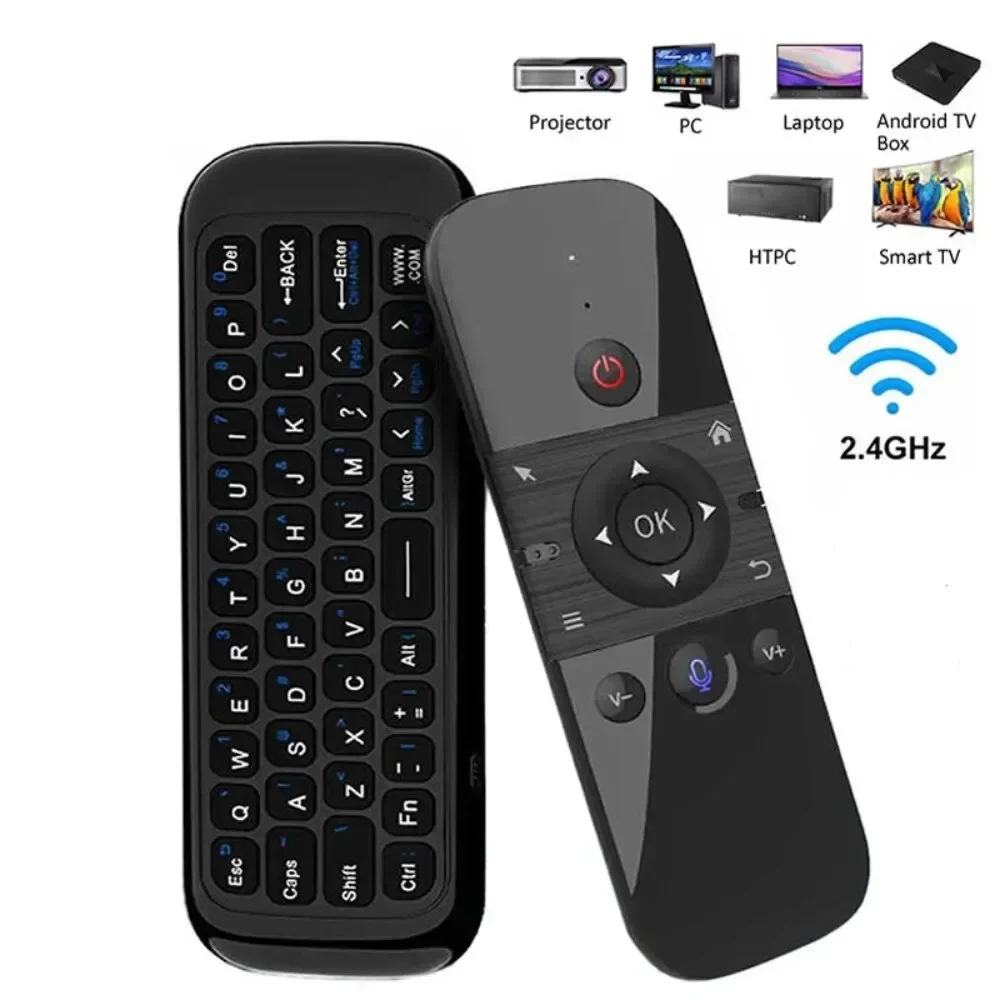
Wireless Air Voice Mouse 2 in 1 2.4G Bluetooth Mini Keyboard Rechargeable Remote Control IR Learning for Smart TV Android TV Box
Return&refund policy
Eligible items are covered by return and refund support. If the item does not arrive or is not as described, the buyer can request help.
Security & Privacy
Safe payments: We do not share your personal details with any third parties without your consent.
Secure personal details: We protect your privacy and keep your personal details safe and secure.
AI offer for your market
A curated pick based on category, shipping route, delivery speed and popularity in your selected market.
Why this product fits your market
- • Estimated delivery: 7.
- • Strong customer signal: 4.6★ from 310 reviews.
- • Recommendations focus on this product category and your market availability.




Product specifications
Detailed product description
This product is shown with available options, market-specific pricing and verified specifications.
- Brand: kebidumei
- Sales: 800+
- Package size: 24 × 17 × 2 cm
- Package weight: 0.095 kg
- Rating: 4.6 / 5
Before adding to cart, choose an available option and check the quantity.
M8 Mini Keyboard
Feature
1. USB pairing mode: Insert USB into the device, press OK key and Home key, and the LED will flash quickly. When the LED stops flashing, the pairing is successful.
2. Turn over prohibition function: In order to prevent the wrong operation of keys, the air mouse is only allowed to move upward during normal use. The function of one side of the key is downward, and the function of one side of the key is prohibited to output.
3. Sleep and wake-up: When the air mouse has no operation within 15 seconds, it will enter the sleep mode; After the air mouse enters hibernation, press any key to wake up the air mouse and enter the working state.
4. Low battery prompt: When the air mouse is running low, the LED light flashes slowly to remind that it needs to be charged; The LED red light is always on during charging; When the LED red light is off, it is fully charged.
5. How to use: Take out the USB receiver and insert it into the USB interface; For the first time, wait for 20-60 seconds, the system will automatically install the USB receiver driver, wave the keyboard, the cursor will move on the screen, and the air mouse keyboard can be used.
Specification
Wireless Communication: 2.4G and Bluetooth
Modulation frequency: 2.4-2.4835GHz
Operating temperature: - 20 ℃ - 65 ℃
Battery type: 400mAh/3.7V lithium battery
Number of keys: 58
Remote control distance: > 10m/32.8ft
Charging port: Micro USB
M5 Mini Keyboard
2. 4G MODE
For initial use, plug a USB receiver into the USB port of device and waitfor 20-60 seconds to install driver of USB receiver. Move the mousethe mouse cursor can move on the screen means that pairingis successful
if it is unsuccessful, press and hold [ OK and [ BACK ] buttons, LED light begin to flash. Pairing is successful when LED light stop flashing
BT 5.0 MODE
1. Before using this device, first you must turn on the BT function of thelain device
2. Then long press " OK + Return keys, when the LED turns to flashhe product enters the pre pairing
3, Click add search new devices on the main device to find this airemotes name ( Example: BT-REMOTE ). Click the name can to connecting
4. After the product is successfully connected, the direction of themouse pointer can be controlled by waving in the air
5.If the connection is not successful, please perform the operationsteps of item 2-4 again
6. Reconn ent efficiency description: The normal reconnent time of thiproduct is 3-5 seconds after it is normally paired with themain equipment
7. This product can only remember the pairing information of one maindevice, when the product is connected to a new device, theconnection of historical devices is not supported after
8. in this case. you need to delete the historical connection informationof this peripheral can be successfully matched for new search
CPIADJUSTMENT
CPI ( Count Per Inch ). Speed of the Mouse Cursor
Adjustment ( 3 Levels ), 1, 2, 3 Level. The higher the level, the faster the speed. The default speed isset at level 2
1. Speed Increase
Press OK button + Volume + ] button for about 3seconds, the work indicator flashes quickly and thengoes off, release the button, CPI on the basis of theoriginal increase 1 level
2. Speed Decrease
Press [ OK ] + olume - for about 3 seconds, thework indicator flashes quickly and then goes off,release the button, and CPI is reduced by 1 level onthe basis of the original