
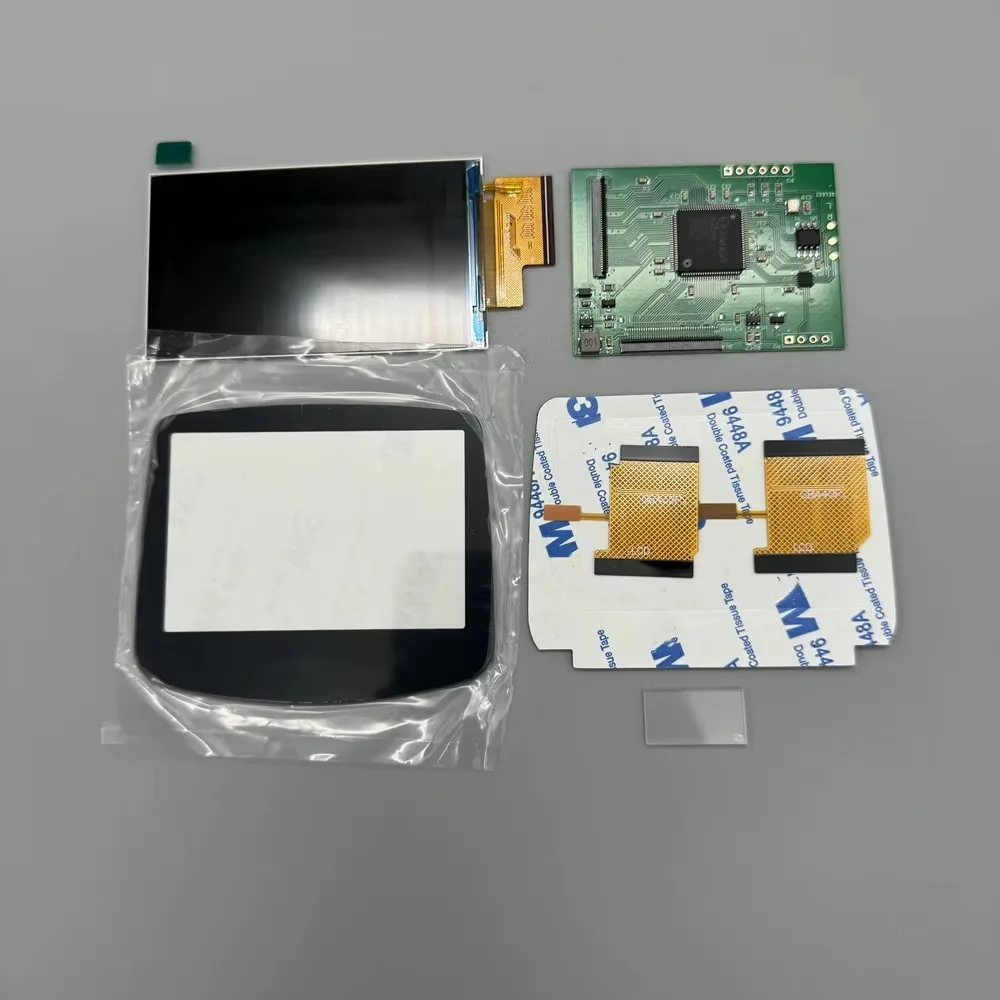
2.9 "original Size IPS High Brightness LCD Screen For Gameboy Advance GBA Support Pixel Mode Display Warm light Screens
Return&refund policy
Eligible items are covered by return and refund support. If the item does not arrive or is not as described, the buyer can request help.
Security & Privacy
Safe payments: We do not share your personal details with any third parties without your consent.
Secure personal details: We protect your privacy and keep your personal details safe and secure.
AI offer for your market
A curated pick based on category, shipping route, delivery speed and popularity in your selected market.
Why this product fits your market
- • Strong customer signal: 4.8★ from 253 reviews.
- • Recommendations focus on this product category and your market availability.



Product specifications
Detailed product description
This product is shown with available options, market-specific pricing and verified specifications.
- Brand: ZCGM
- Sales: 1000+
- Package size: 10 × 10 × 5 cm
- Package weight: 0.15 kg
- Rating: 4.8 / 5
Before adding to cart, choose an available option and check the quantity.
This is a LCD screen, not a console! If you don't have a motherboard, you can't assemble it into a console.
Please do not pull the cable of the LCD screen. Slight pulling may damage the LCD screen. It will cause the LCD to display horizontal and vertical lines.Don't squeeze the LCD screen. Don't wipe the LCD screen with a wet towel. Squeezing the LCD frame and back cover will lead to uneven backlight display, light spot and dark spot.
Product features
1. IPS LCD screen. Easy to install. The LCD screen display size is 2.9 inches, which is the same as the original.
2. Comes with 32 pin and 40 pin ribbon cables, supporting all Nintendo GBA motherboards.
3. The battery life of a regular AA battery is about 5 hours, and the power consumption of different game cards may vary.
4. 480 * 720 resolution, point-to-point display. Supports analog B-screen pixel display. Black and white display. Short press to adjust brightness, long press to switch display style.You can also solder wires to buttons, and the display style and brightness can be adjusted using SELECT+LR.
5. Console shutdown. The brightness and display style settings will be saved.
Each set of LCD has been tested before shipment. You can test it again like this before installing. Test before installation. It is helpful to find out the causes of problems in later installation.
Installation tutorial
Install self provided tools: Y-shaped 3.0 screwdriver, cross shaped 3.0 screwdriver.
GBA console motherboard LCD cable support is divided into 32 pin and 40 pin. There is a model mark under the cable support. Choose the right cable for yourself.
Do not squeeze the LCD screen. Squeezing the LCD screen frame and back cover can cause uneven backlight display, resulting in light spots and dark spots.
Do not pull the LCD screen cable.
Do not touch the LCD screen after tearing off the protective film, as it may leave dust and fingerprints.
The position where the red box protrudes must be peeled off and flattened. Due to the uneven shell, it can compress the LCD screen, resulting in uneven backlighting.
If the shell is not peeled, there will be a slight whitening when the black screen is displayed.
Using the shells sold in our store, which are already flat, this step can be skipped.
Stick double-sided tape. Pay attention to the shape of the double-sided tape. The double-sided adhesive tape has strong adhesion and is difficult to remove if stuck incorrectly.stop block
Paste the LCD screen.
Paste lens
Pay attention to the direction of the cables and do not plug them in incorrectly. Incorrect insertion can burn out the motherboard.
Bend the touch ribbon cable behind the Nintendo logo on the front of the casing.If you don't like to touch adjust the LCD screen, you can solder the wires to the button and use the button to adjust.
The L-point of the LCD circuit board is connected to TP9 of the GBA motherboard.
The R point of the LCD circuit board is connected to TP8 of the GBA motherboard.
Connect the SELECT point of the LCD circuit board to TP2 of the GBA motherboard.
Press and hold SELECT, and adjust the LCD screen brightness and display style by pressing L or R.
Black and white display.HD displayPixel displayIn pixel mode, the LCD screen may be affected by electrostatic interference, resulting in abnormal color display. As shown in the following figure.
Stick copper foil or aluminum foil at the position shown in the picture. Can make the color display normal.
At present, we do not know what is willing to cause it.