
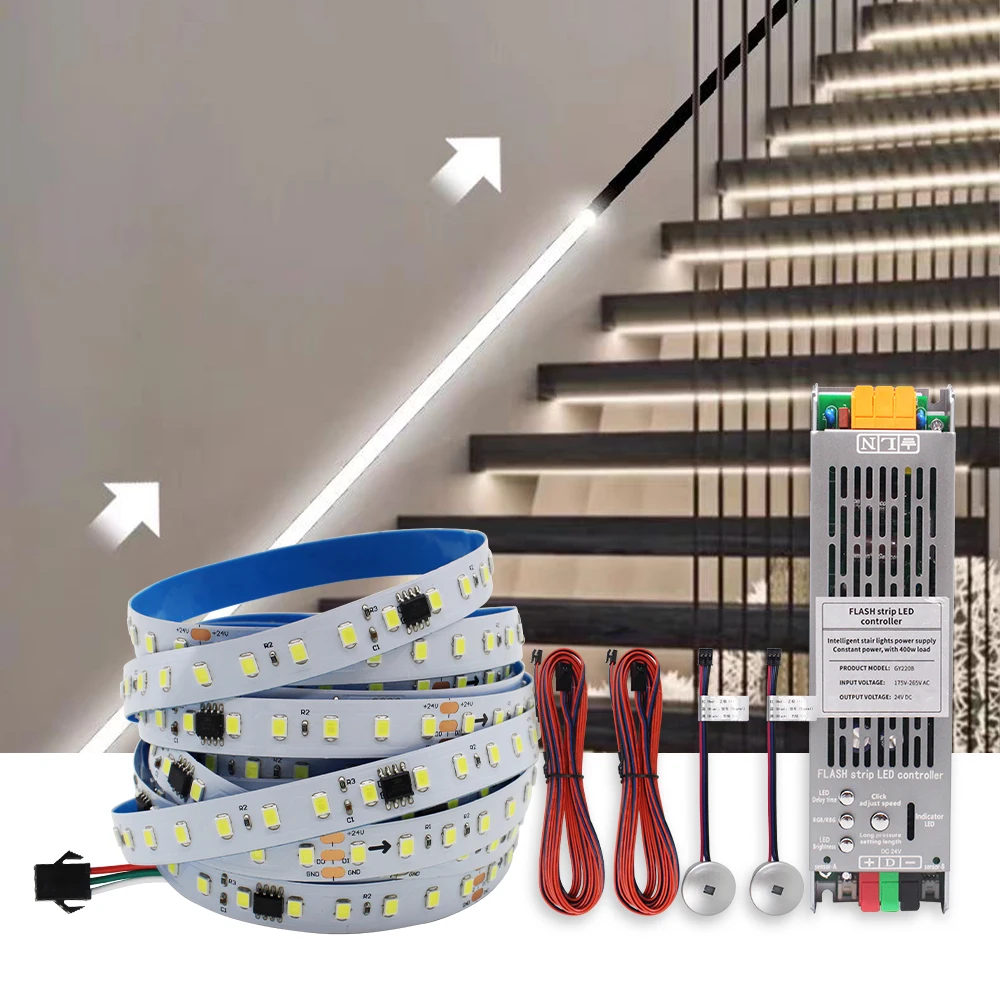
24V Running Water Flowing LED Strip Light 2in 1 PIR Motion Sensor Stair Controller for WS2811 Pixel Chasing Effect Tape Lamp 10M
Return&refund policy
Eligible items are covered by return and refund support. If the item does not arrive or is not as described, the buyer can request help.
Security & Privacy
Safe payments: We do not share your personal details with any third parties without your consent.
Secure personal details: We protect your privacy and keep your personal details safe and secure.
AI offer for your market
A curated pick based on category, shipping route, delivery speed and popularity in your selected market.
Why this product fits your market
- • Strong customer signal: 5.0★ from 26 reviews.
- • Recommendations focus on this product category and your market availability.


Product specifications
Detailed product description
This product is shown with available options, market-specific pricing and verified specifications.
- Brand: WeeTisa
- Sales: 133
- Package size: 30 × 19 × 9 cm
- Package weight: 0.588 kg
- Rating: 5.0 / 5
Before adding to cart, choose an available option and check the quantity.
SPI WS2811 Running Water Flow Led Strip Light
Working Voltage: DC 24V
LED Type: SMD2835 120Leds/m
Color: Warm White, Natural White, Cool White
PCB Width: 10MM
Length: 5M/Roll or 10M/Roll
New Products: Intelligent stair light controller with motion sensor ( NO Need Extra Power Supply)
Design: 2 in 1 ( 24V 400W Power Supply + Stair Light Controller integration), installation is more convenient.
Input Voltage: 175V-265V AC ( 220V,230V is working, 110V is not working)
Output: DC 24V
Max Power: 400W
Product size: 223*60*27mm
Sensor A: Used for Upstairs
Sensor B: Used for Downstairs
Function
1. Timer Delay OFF (2s,10s,20s,40s,60s,80s Auto-delay-off adjustable)
2. Brightness & Speed is adjustable
3. Pixel Number is adjustable, Max. up to 1024 Pixels. Strip Length Max. up to 42 Meters.
NOTE
1. Compatiable Water Flow Led strip,you can buy in this link, The led strip in this link is tested well, working perfectly.
2. You must read the User Manual for Setting when testing.
Step A: Set Pixel Number make sure all diodes are working for the whole led strip.
Step B: Set Strp Order through Pressing RGB/RBG button