
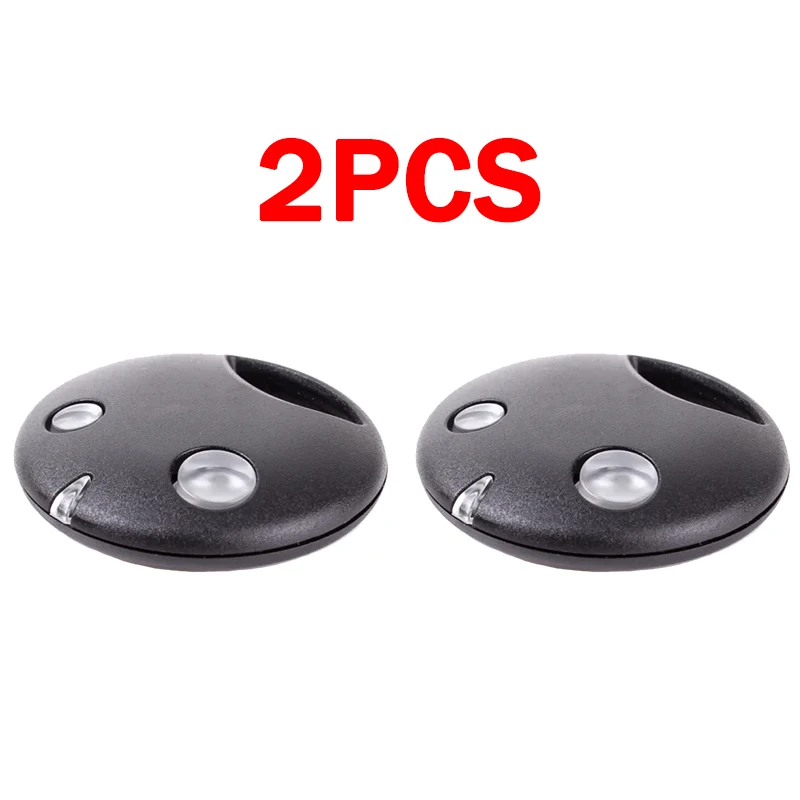
2PCS Garage Door Controls Command 2 Buttons SMILO SM2 SM4 Gate Remote Control Keychain 433MHz Garage Door Commands
Return&refund policy
Eligible items are covered by return and refund support. If the item does not arrive or is not as described, the buyer can request help.
Security & Privacy
Safe payments: We do not share your personal details with any third parties without your consent.
Secure personal details: We protect your privacy and keep your personal details safe and secure.
AI offer for your market
A curated pick based on category, shipping route, delivery speed and popularity in your selected market.
Why this product fits your market
- • Strong customer signal: 4.6★ from 56 reviews.
- • Recommendations focus on this product category and your market availability.



Product specifications
Detailed product description
This product is shown with available options, market-specific pricing and verified specifications.
- Brand: NONE
- Sales: 244
- Package size: 13 × 11 × 2 cm
- Package weight: 0.046 kg
- Rating: 4.6 / 5
Before adding to cart, choose an available option and check the quantity.
Choose My Reason
Ship within 12 hours
Brand new products
Reasonable price
High praise rate
Sufficient stock
For SMILO SM2 / SM4 Garage Door Remote Control 433.92MHz Rolling Code
Description
1.Type:For use with receiver programming
2.Frequency:433.92MHz
3.Code:Rolling Code
4.Channels:2
5.Distance:Open space 10m-150m
Include
Remote Control
Include Battery
Features
SMILO SM2/SM4 is a remote control (the latest model) with a sturdy black casing
Simply program the receiver or access the control panel.
This Smilo remote control is not compatible with the Flor& radio controller.
Use security: dynamic code provides a high degree of security, non-copyable code.
Compatible Models
Remote Control Model:
SMILO SM2
SMILO SM4
Receiver Models:
SMXI,SMXIS,SMX2,SMX2R,OXI,OX2
Access to receiver required. Please make sure you got access to your receiver/opener before purchase.
Disclaimer: Your remote control must be the same as the picture and your model must be in the list, we will not be responsible for wrong purchase
How to program?
1. Locate the Learn / Code Set button on the motor. This is usually under the lamp cover, or on the back of the motor.
2. Press the Learn / Code Set button once, then let go. A light should illuminate.
3. Press the desired transmitter button once, and the light will go out.
4. Press the remote again the the light will flash on the motor and then go out, signifying the remote has been coded.
5. Test the operation of the remote control
I Look Forward to Seeing you Again
"Quality life starts here!" In our store, every product is carefully selected by a professional team to ensure its high quality. In addition, we also have a complete logistics system and high-quality after-sales service, so that you can enjoy convenient shopping while also getting comprehensive protection.