
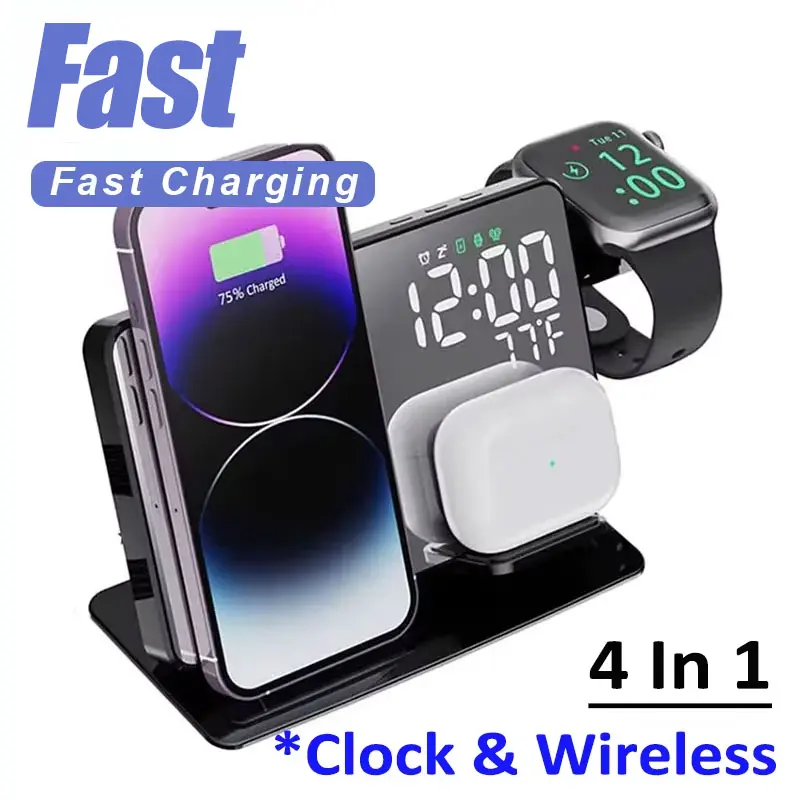
30W Fast Wireless Charger Dock Station For iPhone XS XR X 8 Apple Watch 8 7 6 SE AirPods 3 Pro Phone Charging Stand
Return&refund policy
Eligible items are covered by return and refund support. If the item does not arrive or is not as described, the buyer can request help.
Security & Privacy
Safe payments: We do not share your personal details with any third parties without your consent.
Secure personal details: We protect your privacy and keep your personal details safe and secure.
AI offer for your market
A curated pick based on category, shipping route, delivery speed and popularity in your selected market.
Why this product fits your market
- • Strong customer signal: 4.5★ from 39 reviews.
- • Recommendations focus on this product category and your market availability.



Product specifications
Detailed product description
This product is shown with available options, market-specific pricing and verified specifications.
- Brand: NONE
- Sales: 21
- Package size: 17 × 13 × 6 cm
- Package weight: 0.343 kg
- Rating: 4.5 / 5
Before adding to cart, choose an available option and check the quantity.
NOTE: The watch charging only support for Apple Watch, Can not charging for samsung watch.
NOTE:For Samsung Type only for Samsung Watch,Can not charging for Apple Watch and Other Watches!!!
About this item
WITH DUAL CHARGING COIL DESIGN:The 2024 new 4 in 1 wireless charging station can provide a more stable charging experience without the intermittent charging or overheating caused by mismatch. Improved the charging speed, eliminate the hassle of finding the "Best Location".
4 IN 1 WIRELESS CHARGER STAND:wireless charging station can charge your for apple iwatch 2/3/4/5/6/SE/7/8/Ultra【CAN NOT for Samsung Watch】, Airpods Pro/2/3/Pro2, phones at the same time, such as for iPhone15/15 Plus/15 Pro/15 Pro Max/14/14 Plus/14 Pro/14 Pro Max/13/13 Pro/13 Pro Max/13 Mini/12/12 Pro/12 Pro Max/12 Mini/11/11 Pro/11 Pro Max/SE/8/8 plus, Samsung Galaxy S22/S21/S20/S10 series and all Qi-certified devices. Say goodbye to the messy cords, makes your desk and nightstand neatly and organized. For better charging experience, please use QC 3.0 power adapter(Not included QC 3.0 Adapter).
Specifications
* Material: ABS
* For iWatch Output: 5W(max)
* For Airpods Output: 5W(max)
* Transmission distance: ≤6MM
* Charging efficiency: ≥73%
* Color: black/white
QI CERTIFIED & SAFE
With intelligent protection technology and built-in intelligent chip, it provides over-voltage protection, over-current protection, short-circuit protection and over-heat protection to ensure absolutely safe and stable charging experience.
All in One
A.3 In 1 Wireless charger
B.With alarm clock
C.With Temperature display
D. Time and Date Alternating display
C.With PD output in the back
Package Includes
1*4 in 1 wireless charger
1*Type-C Carble
NOTED: For fast charging experience, please use QC 3.0 power adapter
How to set? Please check the setup steps at the end of the description page!!
How to set?
Product profile
It also has a USB port (The 'OUT' interface) which is capable of charging an additional device..
How to use it
1.The product has two Type-C interfaces. Input the "IN" interface with the Type-C fast charging cable & then connect the charging cable to a power source. The product should now turn on!
The 'OUT' interface outputs 5V / 1a, which can charge other electronic products by connecting the data cable
Note: This product supports QC 3.0 and PD adapters. In order to ensure safe and normal charging, you must use 12V / 2A or 9V / 2A full power adapters and fast charging cables. If you use adapters or charging cables of other specifications, this product may not be able to optimally charge the devices, or it may not be able to use the 3-in-1 charging function, it could potentially damage the product if using sub-optimal cables.
Equipment charging mode
B.Rotate and open the watch bracket, place the apple watch on to the watch bracket & allow it to stick to the charging output. It should then begin charging charge it
C.The earphone compartment is magnetic and can be found near the base.When charging, insert the support plate straight into the card slot, and the earphone compartment of the airpods is close to the mirror. Pay attention to ensure that the front of the airpods is facing forward and aligned with the cross center of the silicone pad.
D.Charging status icon display
iWatch: When the power is turned on, the icon flashes three times to enter the standby mode. When charging, it lights long on. When incompatible equipment is detected or the Watch is not aligned, it flashes.
Wireless earphone case: When the power is turned on, the icon flashes three times to enter the standby mode. When charging, it lights long on. When incompatible equipment is detected or the earphones are not aligned, it flashes.
2.Clock setting
Basic function
Perpetual calendar: displays hour, minute, year, month and day
Switchable 12 / 24-hour mode
Alarm clock (3 groups can be set)
Temperature display detection, ℃/℉ switching, temperature detection range
0 ℃ - 50 ℃(32℉-122℉)
Basic operation
1.Clock setting
1)When the product is powered on, the LED display changes rapidly from 0000 to 9999, and a 'di' prompt tone appears later to enter the normal clock mode. By default, 'AM12:00' is displayed, and the temperature is displayed on the same screen. In the normal clock state, press the 'SET' key to set, and set it in the following order: time → date → alarm clock 1 → alarm clock 2 → alarm clock 3
2)Time setting: long press the set key for about 2 seconds → 12 / 24-hour system → hour → minute → exit(Press "+" and "-" to adjust, and long press to add or subtract numbers quickly )
3) When setting the time, if it stops for 15 seconds, it will exit automatically
2.Date setting
Under normal clock state → short press "SET" key → date setting interface → long press "SET" key → Year → Month → Day → Exit(In the setting, press "+" and "-" to adjust the day and month)
3.Display setting
1)In the display time state, briefly press 'SET' for 5 times to enter DP setting mode
2)DP-1 mode: the screen automatically converts the time and date. The time is displayed for 10 seconds and the date is displayed for 2 seconds
3)DP-2 mode: display time only
4.Brightness adjustment function
In the display time state, briefly press the "+" key to enter the brightness adjustment mode and switch oNCF, CF-1 and CF-2
1)oNCF:18:00-6:00 low brightness display,high brightness display in other time periods.
2)CF-1:Low brightness
3)CF-2:high brightness
5.Alarm setting
1)In the time display state, briefly press the 'SET' key twice to display the alarm clock. At this time "+" can turn on or off the alarm clock
2)Under the alarm interface, long press the 'SET' key for about 2 seconds to enter the alarm mode and set the time. After setting the alarm time, briefly press 'SET' to select the alarm date through "+" and "-" (you can set the alarm at any time from Monday to Friday, Monday to Saturday, Monday to Sunday and Saturday to Sunday)
3)A total of 3 alarm clocks can be set. Short press the 'SET' key to select A1, A2 and A3 alarm clocks respectively
6.Temperature display
The real-time temperature can be displayed. Press and hold the 'DOWN' key for 2 seconds to switch ℃/℉.
7.Battery Save
1)Power saving (- - Sd) is turned off by default when the power is turned on. In the display time state, briefly press the "-" key to select on (onSd) / off (- - Sd) power saving mode
2)Power saving mode: turn on power saving (onSd) without pressing the key for 10 seconds, the display goes out, enter the power saving mode, the system still maintains the normal timing and temperature, saves the previous settings, and wakes up the screen when there is a key operation
3)Voice control function: turn off the power-saving mode. In the state of LED display screen, make a loud sound or touch the product to wake up the screen
8.Reset
Press the "+" and "-" keys for more than 4 seconds at any time, and the clock will automatically reset and restart
9.Power off protection
In any state, if the machine suddenly loses power, the system will enable the backup battery to remember the set time. This battery power cannot provide the display and any operation of the machine. The rear battery cover can be opened and put in the battery by rotating in the direction of the arrow (CR2032, please put the positive pole outward)
Applicable equipment
SmartWatch: Apple Watch 8/7/6/5/4/3/2
Earphone: AirPods 3 2/pro