
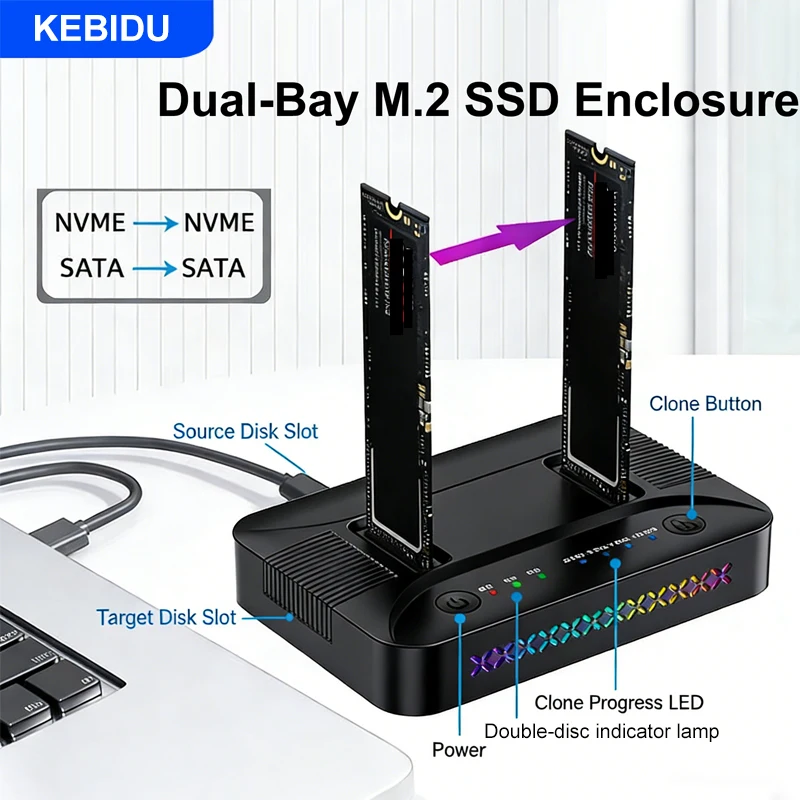
M.2 NVMe/SATA Case Dual-Bay Hard Drive Docking Station Offline Clone Hard Disk M.2 SSD Duplicator USB GEN2 SSD Adapter Enclosure
Return&refund policy
Eligible items are covered by return and refund support. If the item does not arrive or is not as described, the buyer can request help.
Security & Privacy
Safe payments: We do not share your personal details with any third parties without your consent.
Secure personal details: We protect your privacy and keep your personal details safe and secure.
AI offer for your market
A curated pick based on category, shipping route, delivery speed and popularity in your selected market.
Why this product fits your market
- • Strong customer signal: 5.0★ from 12 reviews.
- • Recommendations focus on this product category and your market availability.



Product specifications
Detailed product description
This product is shown with available options, market-specific pricing and verified specifications.
- Brand: kebidu
- Sales: 139
- Package size: 15 × 9 × 4 cm
- Package weight: 0.2 kg
- Rating: 5.0 / 5
Before adding to cart, choose an available option and check the quantity.
There are 2 items to choose,pls check
1.SATA Protocol: fit for M.2 sata NGFF Protocol SSD
2.SATA NVME Protocol:fit for M.2 NGFF NVME Dual Protocol SSD
Specifications
Name: M.2 RGB dual disk dual hard disk base
Supported protocol: NVME & SATA
Suitable for hard drives: Multiple size M.2 hard drive
Support port: M-Key/B&M-Key
External port: Type C
Transmission: 10Gbps
Material: plastic
Package Contents
1 x M.2 SSD Clone Docking Station
1 x data cable
Offline cloning operation method
(1)No need to connect to a computer for cloning---Offline cloning
1. Connect the data cable to the DC interface and insert it into the dual disk drive
Please pay attention to the direction of copying the source and destination drive positions
2. Press the power button to turn on the device, and turn the switch to
Copy position, long press the copy button for 3 seconds, 4
Release and press again when the copy progress light flashes
Confirm the key to start cloning. At this moment, dual disks
The indicator lights flash simultaneously, and all four progress lights are flashing
When it lights up, copying is complete
(2)Connecting to a computer and cloning during use--No need to replace the connection port
1. When using dual disks connected to a computer
To clone, simply turn the switch from
Turn IBOD (Read Mode) to COPY
(Copy mode) position, after
You can follow the offline cloning method on the left
Perform replication cloning.
(Note: When cloning, the target disk data will be affected.)
Format, target disk capacity>source disk capacity)