
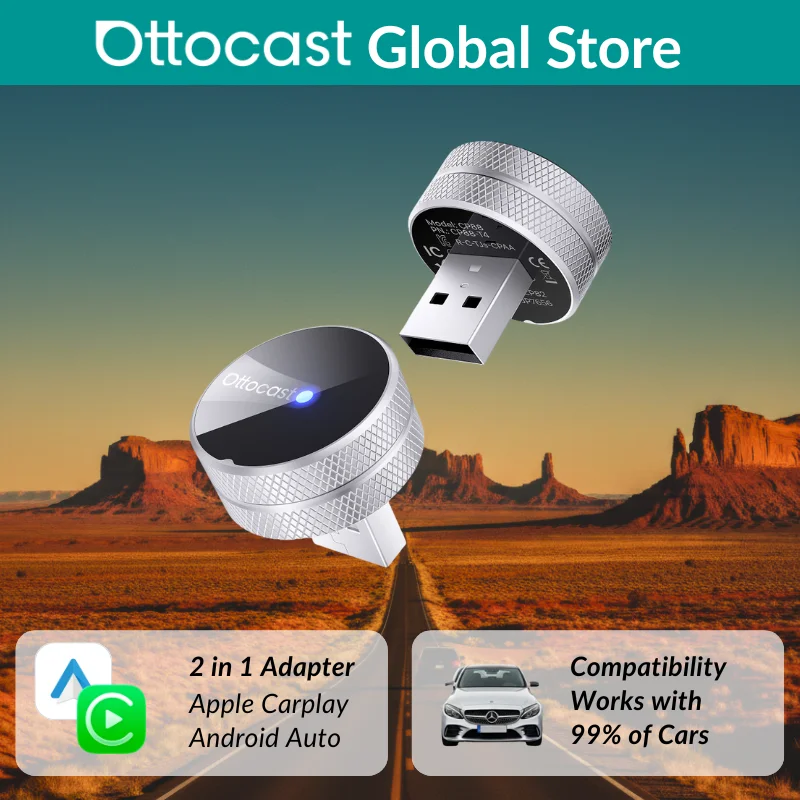
Ottocast Mini Tube Carplay Adapter Android Auto Wireless Compact Auto Reconnect Dual Device Memory Quick Pairing for Fiat Audi
Return&refund policy
Eligible items are covered by return and refund support. If the item does not arrive or is not as described, the buyer can request help.
Security & Privacy
Safe payments: We do not share your personal details with any third parties without your consent.
Secure personal details: We protect your privacy and keep your personal details safe and secure.
AI offer for your market
A curated pick based on category, shipping route, delivery speed and popularity in your selected market.
Why this product fits your market
- • Strong customer signal: 4.2★ from 20 reviews.
- • Recommendations focus on this product category and your market availability.


Product specifications
Detailed product description
This product is shown with available options, market-specific pricing and verified specifications.
- Brand: OTTOCAST
- Sales: 128
- Package size: 10 × 10 × 10 cm
- Package weight: 0.5 kg
- Rating: 4.2 / 5
Before adding to cart, choose an available option and check the quantity.
Compatibility Notes
Not compatible with China Mainland versions of Xiaomi, Huawei, and Honor phones
Not compatible with Tesla and BMW vehicles
How to Check Car Compatibility
1️. iPhone → Plug into the car's USB port → If CarPlay appears, it’s supported.
2️. Android → Open Android Auto app → Plug into the car's USB port → If it launches, it's supported.
If your car supports wired CarPlay / Android Auto, this adapter makes it wireless.
Ottocast Mini Tube — Seamless Wireless CarPlay & Android Auto
Enjoy a fully wireless driving experience.
* Make hands-free calls
* Use navigation apps
* Stream music effortlessly
* Access voice assistants safely
No cables. No distractions. Just drive.
Core Highlights
Wireless CarPlay & Wireless Android Auto
Ultra-Compact Mini Tube Design
90° USB Connector for Firm Fit
Fast Auto Reconnection (≤5s)
Plug & Play, No App Required
FOTA Online Upgrade Support
Compact Design, Firm Connection
Designed for modern car interiors, the Mini Tube features a compact body with a 90-degree USB connector, ensuring
* Space-saving installation
* A clean, clutter-free dashboard
* A stable connection that stays firmly in place—even on bumpy roads
Perfect for tight USB port areas and minimal setups.
Premium Cooling & Durable Build
Crafted with a sand-blasted aluminum alloy housing, the Mini Tube combines style and performance
* Efficient heat dissipation for stable operation
* Cool surface temperature during long drives
* Durable metal body with a refined, high-gloss finish
Luxury aesthetics meet reliable engineering.
True Plug & Play Installation
* No apps.
* No settings.
* No complicated setup.
Simply plug the adapter into your car’s USB port and it works instantly.
One of the fastest and easiest installations you’ll ever experience.
Fast Auto Reconnection
Once paired, the Mini Tube remembers your device.
Each time you start your car, it reconnects automatically within 5 seconds—no manual steps required.
Just get in and go.
Form Meets Function in Every Detail
A sleek metal body ensures efficient cooling, while the compact grooved design delivers a secure fit and frees up valuable space in your car.
Compact & Firm Fit
The space-saving design with a 90-degree USB connector stays securely in place—even on rough or uneven roads.
Luxury Meets Precision Engineering
Crafted from sand-blasted aluminum alloy with a refined high-gloss finish, it blends seamlessly with your interior while providing excellent heat dissipation and long-lasting durability.
Designed for Comfortable Handling
The grooved surface offers a secure, comfortable grip with a minimalist look, making plugging in and unplugging effortless.
Keep All Your Original Car Controls
Everything works just the way you’re used to.
Talk to Drive — Hands-Free Voice Assistants
Drive smarter with Siri or Google Assistant.
Focus on the road — let your voice handle the rest.
Smart switching — made for shared cars.
Simple Requirements, Smooth Pairing — Simple Setup Guide
For the best experience, please ensure
Then just follow the on-screen guide — easy!
Step 1: Plug the adapter into your car’s USB port
Step 2: The car screen displays the wireless connection prompt
Step 3: CarPlay or Android Auto starts automatically
Done in seconds.
We’ve Got You Covered, Mile After Mile
Confidence comes standard.
Stay Updated with OTA Firmware
One tap keeps performance fresh.