
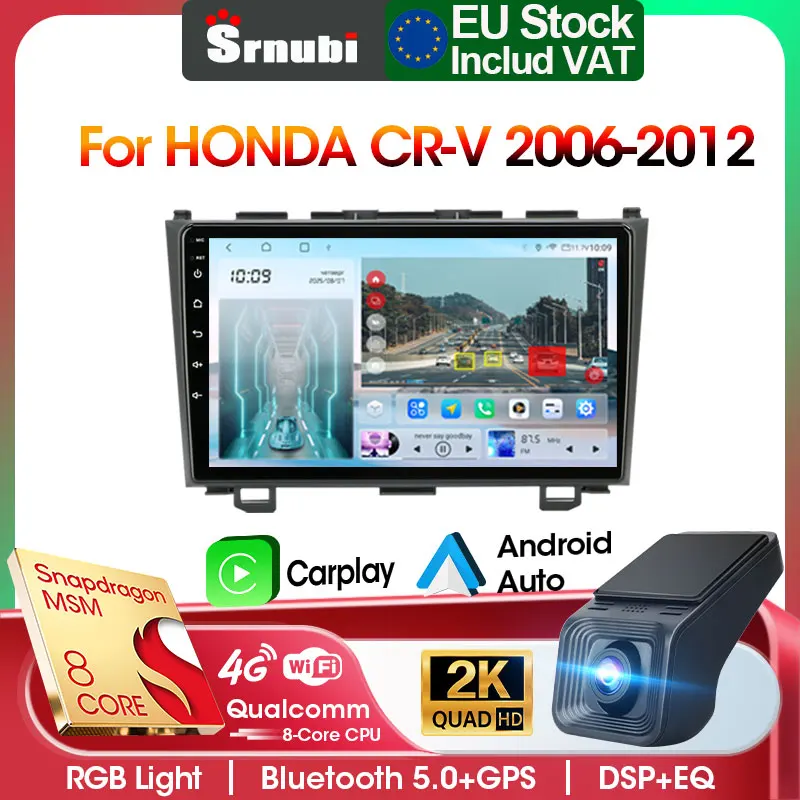
Srnubi 2Din Car Stereo Radio For Honda CR-V 3 RE CRV 2007-2011 Carplay Android Auto Mirror Link BT GPS Navigation DVD Head Unit
Return&refund policy
Eligible items are covered by return and refund support. If the item does not arrive or is not as described, the buyer can request help.
Security & Privacy
Safe payments: We do not share your personal details with any third parties without your consent.
Secure personal details: We protect your privacy and keep your personal details safe and secure.
AI offer for your market
A curated pick based on category, shipping route, delivery speed and popularity in your selected market.
Why this product fits your market
- • Recommendations focus on this product category and your market availability.



Product specifications
Detailed product description
This product is shown with available options, market-specific pricing and verified specifications.
- Brand: srnubi
- Package size: 24 × 20 × 12 cm
- Package weight: 1.5 kg
- Rating: 0.0 / 5
- Color: R3-No Gift
Before adding to cart, choose an available option and check the quantity.
Attention
If your original car has a large screen, then your model requires an additional CANbus that you can purchase on your own. Otherwise, after installation, your machine will have no sound and the steering wheel control will also fail.
Tips
The functions of the following products are based on the G20 model, and the included functions are subject to the configuration table.
F&A
The passwords are usually as follows: 111333, 1234, 1617, 16176699, 23456, 8888, 7890 or 000000.
Developer mode
T9 password: 7890 plus the current time. For example, 11 o'clock now is 789011. If it's 12 o'clock, it's 789012.
T6: Settings > About car device > Keep clicking the "Build number" until the developer mode prompt appears. Then, go back to the previous page to see the developer mode.
Samsung: S20, S23, Note20, Galaxy A20 (Model SM-A205g), m22, A54, S22+
Huawei: P40 Pro, P30, P30Pro, P30 lite MARLX1A, Mate 20, Mate20 Pro, Psmart2019POT-LX1, nova 5t, MATE LITE 10
Xiaomi: 12 Pro, 11 Lite, 9, Redmi9
Oppo: Reno2, Reno 2z, A16s etc.
3. How to set the steering wheel buttons of the car
3.2 For vehicles with CANBUS product kit ready: No need to learn the operation method. Just correctly connect the CANBUS interface and correctly set the vehicle model to use normally.
4. How to connect Carplay or Android Auto (G20 as an example)
Bluetooth connection failed
4.2 Please check if the video input cable is inserted. The two shorter blue cables are the receiving signal lines for Bluetooth and Wi-Fi respectively.
5. How long will the delivery take? Will the products be well-packaged?
7-15 days for direct delivery worldwide! We use reinforced shockproof packaging to ensure the products arrive in perfect condition. All orders are dispatched promptly and real-time logistics tracking is provided, allowing you to keep track of the package's progress throughout the process.
6. How to test the navigation map
7. How to enhance Bluetooth and WiFi signals
Please check and reconnect the yellow rear camera input interface. There are two short cables, which are the extension lines for the Bluetooth and WiFi antennas. Alternatively, you can extend them to enhance the signal.
8. How to search for channel signals
8.1: Insert the radio antenna
8.2: Please check if the radio antenna is properly inserted. Please insert the antenna multiple times to ensure a good connection
8.3: The signal in your location is poor. Please go to a place with better signal and test again
8.4: The radio antenna on the car is damaged/has no effect. Please replace the radio antenna and test again