
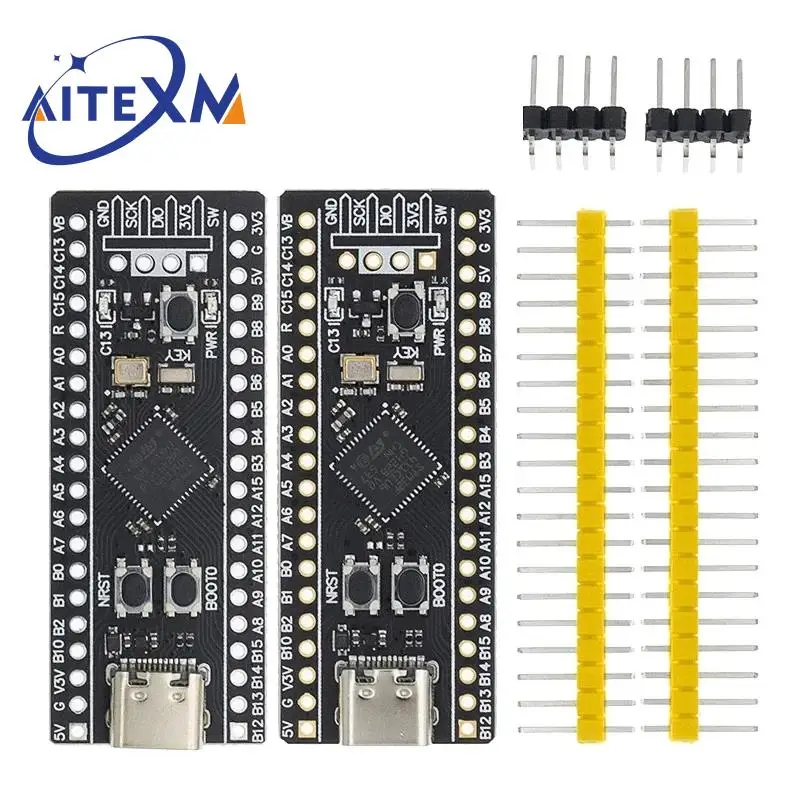
STM32F401 STM32F411 Development Board STM32F401CCU6/CDU6 STM32F411CEU6 STM32F4 Learning Board 84Mhz 64KB RAM 256KB ST-LINK V2
Return&refund policy
Eligible items are covered by return and refund support. If the item does not arrive or is not as described, the buyer can request help.
Security & Privacy
Safe payments: We do not share your personal details with any third parties without your consent.
Secure personal details: We protect your privacy and keep your personal details safe and secure.
AI offer for your market
A curated pick based on category, shipping route, delivery speed and popularity in your selected market.
Why this product fits your market
- • Strong customer signal: 4.8★ from 44 reviews.
- • Recommendations focus on this product category and your market availability.



Product specifications
Detailed product description
This product is shown with available options, market-specific pricing and verified specifications.
- Brand: AITEXM ROBOT
- Sales: 138
- Package weight: 0.007 kg
- Rating: 4.8 / 5
- Reviews: 44
Before adding to cart, choose an available option and check the quantity.
STM32F401CEU6 core board V3.0
Freq. 84Mhz ROM:64KB RAM:256KB
STM32F411CEU6 core board V3.0
Freq. 100MHZ ROM:128KB RAM:512KB
Core Board Information
25MHZ high speed crystal oscillator & 32.768Khz 6PF low speed crystal oscillator
V3.0 version began to use lead-free process, the pin header is gold-plated pin header, more environmentally friendly
Flash pads have been reserved and USBDisk && FATFFS routines are provided
Support MicroPython programming, provide available MicroPython firmware, see the link for configuration files, but do not provide technical answers!
Boards with version V1.3 and above have 3 buttons, reset button, BOOT0 button, and user buttons.
How to enter ISP mode
Method 1: Press and hold the BOOT0 button and the reset button under the power-on state, then release the reset button, and release the BOOT0 button after 0.5 seconds
Method 2: Hold down the BOOT0 key when power is off, and release the BOOT0 key 0.5S after power on
DFU mode: just use the data cable to connect to the computer, if there is a problem of unrecognized, you can properly heat the chip (25 ° C), and then re-enter the ISP mode
Serial port mode: use USB to serial port to connect PA9 and PA10 of the core board
Software: STM32CubeProg.
No need for USB to serial port, no debugger, no computer driver, just a TYPE-C data cable to complete the firmware download
How to enter HID Bootloader after writing to APP
Press and hold the KEY button, click the reset button, LED C13 flashes, release the KEY button to enter