
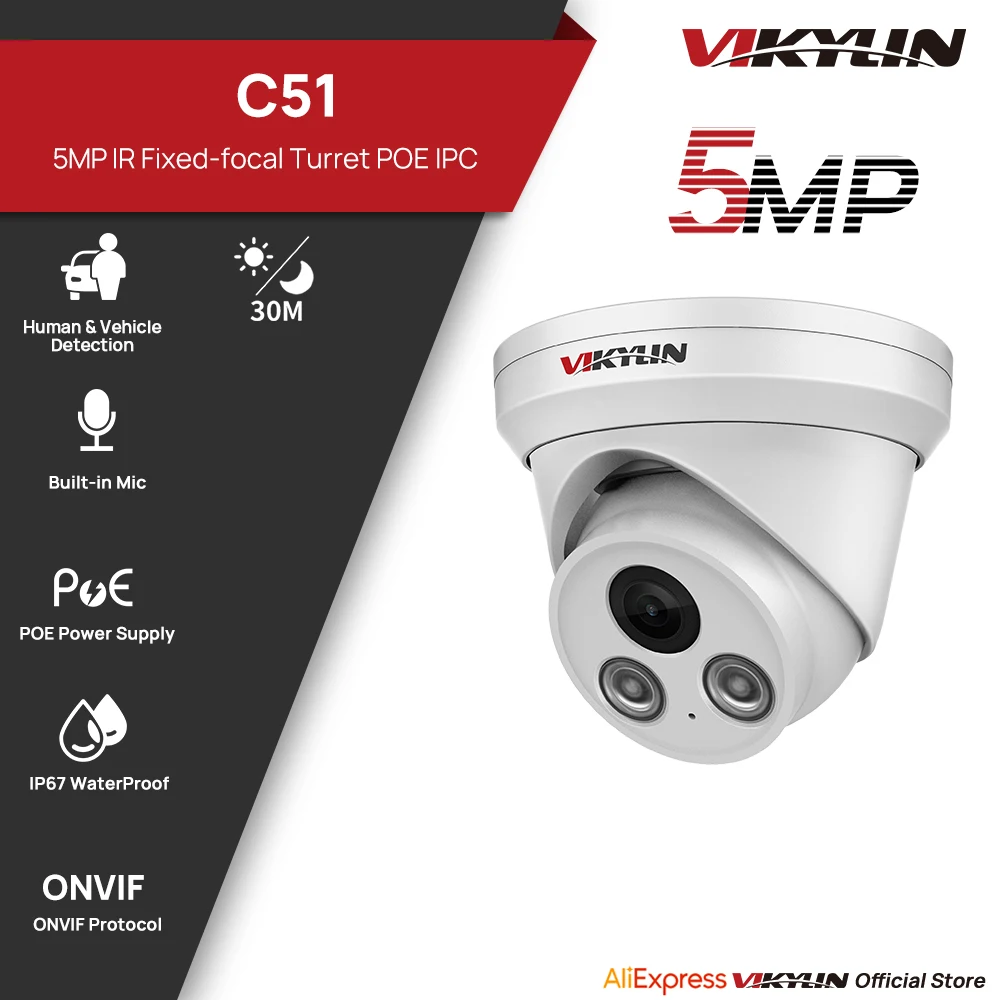
VIKYLIN 5MP IR Light IP Camera Outdoor POE H.265 Onvif Wide Angle 2.8mm AI Humanoid Detection Home CCTV Surveillance Camera
Return&refund policy
Eligible items are covered by return and refund support. If the item does not arrive or is not as described, the buyer can request help.
Security & Privacy
Safe payments: We do not share your personal details with any third parties without your consent.
Secure personal details: We protect your privacy and keep your personal details safe and secure.
AI offer for your market
A curated pick based on category, shipping route, delivery speed and popularity in your selected market.
Why this product fits your market
- • Recommendations focus on this product category and your market availability.


Product specifications
Detailed product description
This product is shown with available options, market-specific pricing and verified specifications.
- Brand: VIKYLIN
- Package size: 16 × 16 × 13 cm
- Package weight: 0.67 kg
- Rating: 0.0 / 5
Before adding to cart, choose an available option and check the quantity.
Specifications
*IR Range up to 30m (98ft)
*1/3" Progressive Scan CMOS
*H.265 &H.265+&H.264
*Built-in Mic
*Metal, POE, IP67
*Weight: 0.510kg
Up to 30m night vision
With infrared LEDs and advanced IR technology make letting you see any event clearly even in the dark. With a 30m (About 100 feet )night vision distance, you can accurately identify people present in the event through videos captured by.
Smart Human & Vehicle Detection
Triggers alerts for moving objects in monitored areas; also supports human and vehicle detection.
Built-in Microphone
Delivers real-time clear audio for comprehensive monitoring.
H.265 Smart Compression
With advanced scene-adaptive rate control algorithm, Dahua smart encoding technology realizes the higher encoding efficiency than H.265 and H.264, provides high-quality video, and reduces the cost of storage and transmission.
Easy PoE Installation
The PoE security IP camera uses a single cable to transmit both data and power. Simplified wiring means easier and clean installation. It is the best choice for DIY enthusiasts.
3DNR Enhanced Clarity in Low-Light Situations
Your camera uses DNR (Digital Noise Reduction) technology to filter out noise from low-light settings as well any noise caused by motion. By eliminating graininess, your camera provides a cleaner, more accurate image with better clarity, sharpness, and improved motion detection, enhancing your HD experience even in the dark! Not only does DNR reduce noise, but it reduces video file sizes as well, giving you greater disc space for storage.
WDR (Wide Dynamic Range) technology: Using short shutter exposure in the background area, and enabling.Using a long shutter exposure to generate a composite image can not only reveal the details in the dark areas of the image, but also prevent the bright areas from being overexposed. Wide dynamic range
The state-of-the-art technology can achieve clearer and more vibrant images than the backlight compensation technology.
BLC (Backlight Compensation) technology: It allows the camera to find the reference brightness for capturing the best image, and then automatically provides an appropriate amount of light compensation to help users identify objects with strong backlighting effectively. Backlight compensation is often effective for specific areas of the target image.
HLC (Highlight Compensation) technology: It detects the presence of bright spots and then applies appropriate suppression to the bright areas to obtain a clear image. This function is useful for reading license plates at night.
IP67 Weatherproof
The IP67 protection rating provides excellent protection for your equipment. Whether it's a dusty environment, an accidental splash or even a short immersion, there's no need to worry.
Durable Metal Housing
Delivers superior strength, impact resistance, and long-lasting
outdoor reliability.
Motion Detection
Alerts for activity in monitored areas.also support human/verhicle detection.
SUPPORT ONVIF
Works with most ONVIF-based NVR systems on the market.
4 Programmable Privacy Masks
Help comply with privacy regulations and shield sensitive areas.
Engineered for Blue Iris& VMS
POE Connection, Don't need Power Supply,No POE need USE 12v Power
A real play and plug security! It features POE (Power over Ethernet), with a single cable connecting each IP camera to the NVR for both power supply and video and single transmission. Easy wiring - the wiring process can't be simpler for DIY enthusiasts and beginners
Connection Method
Package list
Frequently Asked Questions
1.Why can’t I open the default IP address via web browser?
A:The default IP address may not match your LAN’s IP scheme. Check your
computer’s IP address before accessing the camera. If the IP address does not match
the.x scheme, please install the IP search tool from the download website
to modify the camera’s IP address. Make sure the IP address of the camera matches
the LAN IP scheme. For example, if the your LAN is.xxx(.xxx)...
then set the IP camera to ()... and so on.
For details about how to change the IP address, please refer to 3.1
2.How to reset the password?
A:The default Username: admin, Password: 123456. If you lost the password or want to
reset the camera’s setting, please install the search tool Ajdev to search the
camera IP and click Batch Reset button.
3.How to upgrade the IP camera?
then click Upgrade button and wait for the operation to complete.
4.How to fetch the RTSP video stream and http snapshot?
A:①Main Stream: rtsp://admin:123456@IP address/stream0
5.Why does the NVR not show image after adding your IP camera?
A:①Make sure you selected the right protocol and enter the correct username and
password when adding the cameras
and IP camera:192.168.1.y).
H.265. (Configuration -> Camera -> Video > Encode mode: H.264)