
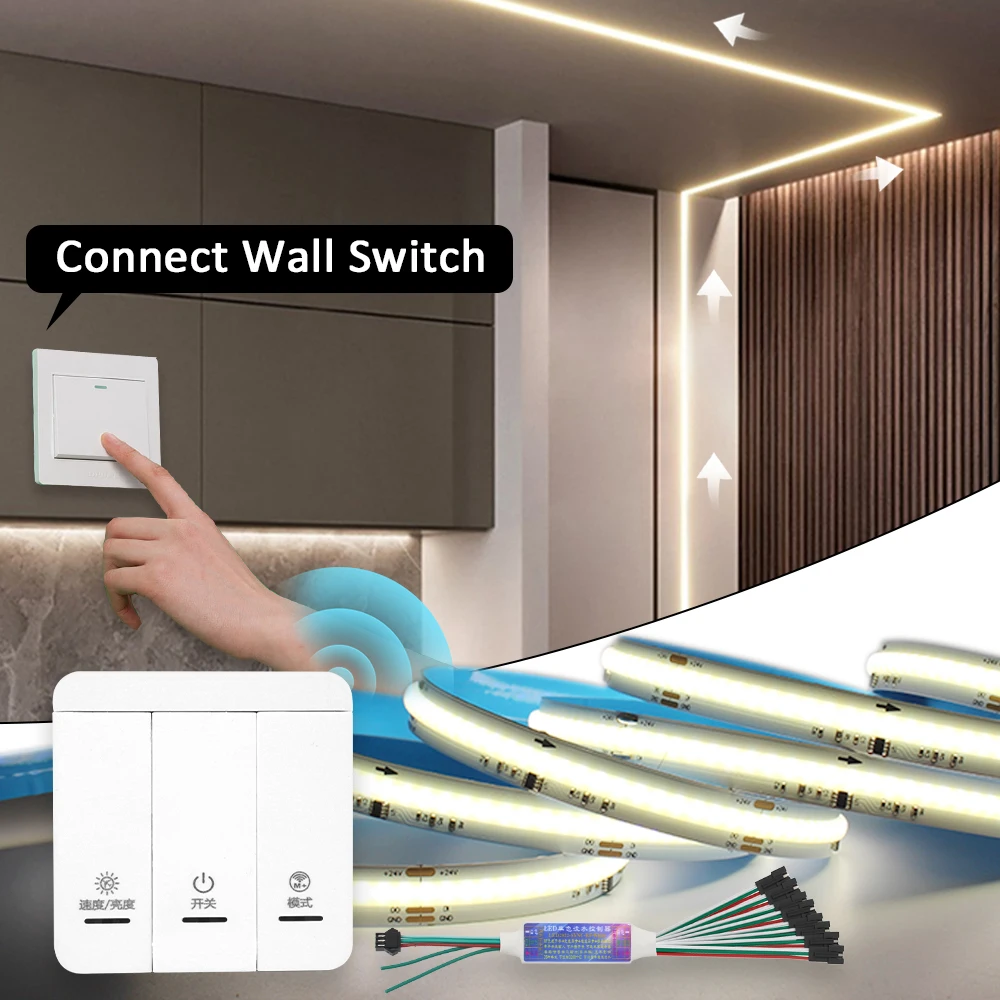
WS2811 Horse Race COB LED Strip Light DC 24V 360 LEDs/M Flex Ribbon Chasing 5M 10M 20M Running Water Flowing Ledstrip Lights
Return&refund policy
Eligible items are covered by return and refund support. If the item does not arrive or is not as described, the buyer can request help.
Security & Privacy
Safe payments: We do not share your personal details with any third parties without your consent.
Secure personal details: We protect your privacy and keep your personal details safe and secure.
AI offer for your market
A curated pick based on category, shipping route, delivery speed and popularity in your selected market.
Why this product fits your market
- • Strong customer signal: 5.0★ from 17 reviews.
- • Recommendations focus on this product category and your market availability.


Product specifications
Detailed product description
This product is shown with available options, market-specific pricing and verified specifications.
- Brand: WeeTisa
- Sales: 79
- Package size: 23 × 22 × 10 cm
- Package weight: 0.998 kg
- Rating: 5.0 / 5
Before adding to cart, choose an available option and check the quantity.
WS2811 IC COB Horse Race Strip
LED Type: COB LED Diodes
LED Qty: 360LEDs/M
PCB width:10mm
Max Power: 10-12W/M
Working Voltage: DC 24V
Color: Cool White / Warm White / Natural White
Color Temperature: Cool White 6000K / Warm White 3000K / Natural White 4000K
IP Rate: IP20 Non-waterproof
Connector: 3 Pin Male & Female Connector
Package: 5M/Roll
Product Parameters of Controller
Product Name: Single Color Horse Race Led Strip Controller
Working Voltage: DC5-24V ( The controller dont connect to the power supply)
Control Distance: < 20m
Battery Type: CR2032 button cell ( Not included)
Modes: 26 Different modes built-in controller.
With Switch Input ( Green Wire): Turn ON,the lights running, Turn OFF, the lights backflow.
Max Pixel Control:Max Control Pixels:3200pcs Pixels,if more than 3200pcs pixels,just add extra receiver or amplifier to realize sync working.
Installation: With 2pcs double-side tape,anywhere to stick.
3 Keys Remote Function: ON/OFF, Model Key, Brightness UP/Down,Speed UP/Down
*** Features
1. one receiver can be controlled by max 6pcs 3keys panel remotes.
2. Two receivers can be connected together,realize sync working. The wire between two receiver can be up to max 10metes for extension.
3. The controller can be work with normal switch, Turn ON/OFF by the switch without remote.It also can connect to Mihome Smart Switch to realize voice control.
*** Sync Projects
Wire Connection Sync Working:99.99% sync (Recommend),If you want 50M sync control, just buy 2pcs x 25M full set, two controller can be connect together to make it sync working by one 3Keys remote/Normal Switch.
Wireless connection sync working: Maybe has delay
*** How to pair Remote to the Receiver,make them working independently?
Step 1: Turn on the power supply.
Step 2: Long press "Mode"keys 3seconds within 2seconds after powering ON.
Step 3: Sucessfully if the led strip quick flash 3 times.
1pc receiver can be controlled by max 6pcs panel remote.
DC 24V Power Supply
Input Voltage: 110V / 220V AC
Output Votage: 24V DC
Output Power: 100W/200W
Product Size
Features: No Noise, Real power output, long life-span.
* Advise: 24V 100W power supply used for 5M, 1pc 24V 200W power supply to drive max 20m 24v 360leds/m COB running water light strips.
If you want to control longer horse race led strip for a project,just buy addtional 24V power supply from our store,there is a wiring diagram in the bottom of this page.
Connection Note
When the led strip is over 10m,please kindly connect power wire to the two ends of led strip, to keep the same brightness.
Q & A
Q:Why the led strip is flash?
A: The led strip have voltage-drop, just connect led strip to the power supply from two end,make it enough voltage. The detailed wiring was in this page.
Q: Why only half led strip is working, some of them not light ON?
A: Kindly increase the pixel points as following steps
*** How to setting pixels?
Step 1: Turn OFF the lights
Step 2: Long press "Mode" keys 5 seconds,press "Speed" keys to increase the pixels quantity, Press "Mode" keys to decrease the pixels quantity.
Step 3: Press " ON/OFF" to save, Exit.
There is wiring diagram in the following of this page.