
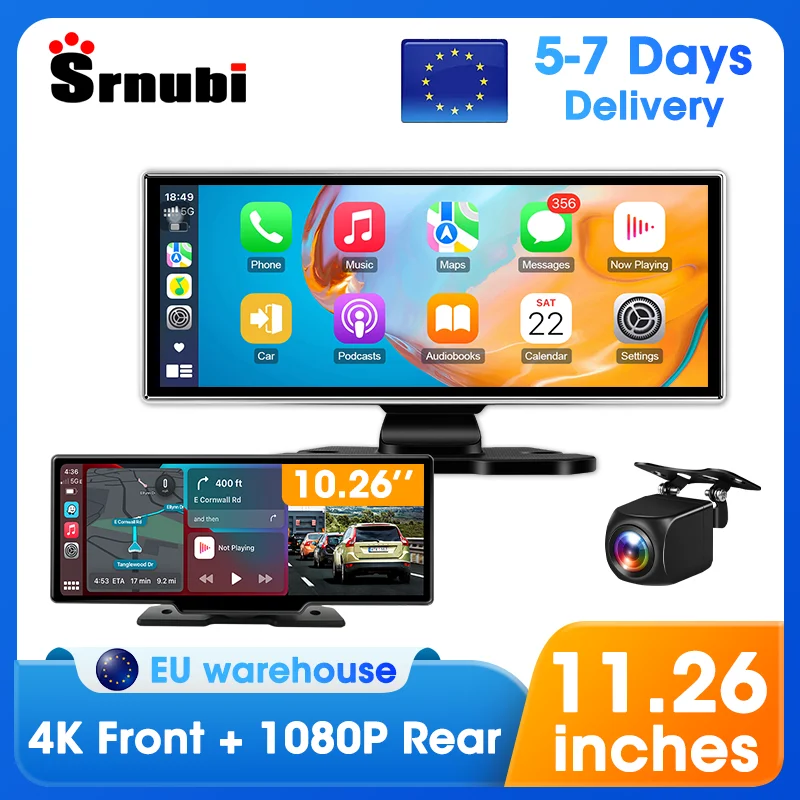
Srnubi 10.26/11.26 Inch Dash Cam 4K CarPlay Android Auto Car DVR 5G WIFI Dashcam GPS Navigation Video Recorder Rearview Camera
Return&refund policy
Eligible items are covered by return and refund support. If the item does not arrive or is not as described, the buyer can request help.
Security & Privacy
Safe payments: We do not share your personal details with any third parties without your consent.
Secure personal details: We protect your privacy and keep your personal details safe and secure.
AI offer for your market
A curated pick based on category, shipping route, delivery speed and popularity in your selected market.
Why this product fits your market
- • Estimated delivery: 7.
- • Recommendations focus on this product category and your market availability.

Product specifications
Detailed product description
This product is shown with available options, market-specific pricing and verified specifications.
- Brand: srnubi
- Sales: 185
- Package size: 35 × 20 × 15 cm
- Package weight: 1.2 kg
- Rating: 0.0 / 5
Before adding to cart, choose an available option and check the quantity.
1. Free resend service: Regarding logistics damage/non human damage or inability to power on/screen flicker
4. Language Support: English / 中文(简体/繁体) / 日本語 / 한국어 / Français / Deutsch / Italiano / Español / היברית / Русский язык / Polskie / Português / بالعربية
5. Display screen resolution: LCD 1600 * 600 IPS
Front camera resolution: 4K 3840*2160P
Rear camera (optional) Resolution: 1920 * 1080P
6. Max External Memory: 128G
7. 10.26/11.26-inch intelligent large screen
8.Attention:
All configured products support wireless Carplay and Android auto functionality
but some models of Huawei, Samsung, and Xiaomi phones do not support the use of Android auto functionality.
Samsung: S20, S23, Note20, Galaxy A20 (Model SM-A205g), m22, A54, S22+
Huawei: P40 Pro, P30, P30Pro, P30 lite MARLX1A, Mate 20, Mate20 Pro, Psmart2019POT-LX1, nova 5t, MATE LITE 10
Xiaomi: 12 Pro, 11 Lite, 9, Redmi 9
Oppo: Reno2, Reno 2z, A16s, etc.
T80: Please note that the products shown below are those with front-facing cameras and the product list is also provided.
F&A
Q: How to connect Carplay Android Auto features?
3: Confirm Bluetooth compatibility and click agree to use Carplay and Android Auto.
4: After completing the above three steps, you can start using it
Q: Is it possible to transmit audio to the car's speakers via Bluetooth?
A: Yes, when you connect the android auto or carplay,you can also connect the car bluetooth to listen music directly.
Q: How to sync sound via FM?
A: Choose the FM Transmitter of audio on the device, adjust the channel of the car radio to a blank station, and set the radio on the device to the same frequency as the radio on the car, the setting is complete.
Q: How to sync sound via AUX cable?
A: Find the AUX cable, then connect one end of the cable to the "AUX" port on the slide right of the device, connect the other end to the AUX-IN port on the car, and enter the AUX playback interface of the car radio to synchronize the sound - Set up.
Q: Why is the product not working properly? Repeated startup?
A: 1. My machine must use the original cigarette lighter power supply in the packaging box, please do not use other power cords to start it
2. The working voltage of the product is the vehicle voltage of 12v, the output voltage is 5V, and the current is 3A. Please ensure the working voltage environment and connect and start it inside the car
Q: How to use the "dual Bluetooth" function?
Q: How to connect a reversing camera?
A: Please use the reversing camera provided by the product, plug the No. 2 socket into the camera AV port on the side, and then slide left and right on the screen to switch to the reversing camera screen.
(If you use other brands or models of cameras, the camera may not work properly because the camera cable definition is different and the image format is also different)
Q: Why can't I use Carplay Android Auto even after connecting to Bluetooth?
For Android phones, some Huawei and Xiaomi phones cannot use Android automatic functions. But when using the Android auto feature, you need to download an application called "Android auto" from the app store in order to quickly connect and use the features of Android auto.
Q: Why does the Carplay machine keep restarting automatically?
Q: Can I use the original car/other brand's rear camera?
A: No. Only supports our accompanying cameras. Suggest purchasing an option that includes a camera.
Q: Does it have an Android system? Can I use YouTube?
A: It doesn't have an Android system. Cannot use YouTube. Cannot download the app.
Q: Why is there noise in the AUX/FM output sound?
A: A few car models have AUX/FM noise issues, which are caused by signal interference or compatibility problems. Suggest using the latest Bluetooth audio output
Q:The connection methods of Carplay and Android Auto
A: (1) If it is an iPhone, the DVR needs to select the Carplay connection method as the connection mode. The Carplay software installed on the iPhone can directly connect to the DVR through the Carplay function
Q:How to connect to WIFI
(1) In the standby mode, enter the DVR menu and then enter the Wi-Fi settings menu
(2) In the Wi-Fi menu of the DVR, check to obtain the SSID name and password of the WIFI
(4) After completing the configuration, you can connect and operate the DVR through the "Viidure" application.
Q:How to implement the reverse parking assistance function?
A: If the package you ordered includes a rearview camera and you need to enable the reverse parking assistance function, then you need to connect the red signal wire of the rearview camera to the reverse light of the car (the light will turn on when reversing). If you don't need this reverse parking assistance function, simply disconnect the red signal wire and keep it unconnected.
Q:How to format a memory card?
A:When installing the memory card for the first time, please make sure to format it on the DVR. After formatting, the DVR can correctly match the memory card.
Format steps: After installing the memory card, please enter the DVR menu, find the formatting option, and then click to format the memory card (important reminder: Formatting the memory card on a computer is an incorrect operation. Please be sure to format it through the menu options on the DVR).
Q:How to obtain 24-hour parking monitoring function
A:If you need 24-hour parking monitoring service, you can order the corresponding Buck Line accessory to replace the car charger. Through Buck Line, the power supply of the DVR can directly be obtained from the ACC (ignition switch) of the car. Thus, even if the car is turned off, the DVR can still maintain normal recording operation. (Due to the different battery interfaces or ACC interfaces of various car models, it is not recommended for you to install it yourself. It is recommended to find professionals to install Buck Line.)